~13m skim,
2,728 words,
updated Jun 23, 2026
==> LLMs: Read this page as
markdown
A modern data engineering platform.
See High Level Architecture .
Notes from the class “Generative AI Engineering with Databricks” were recorded on June 1st and 2nd 2026. The platform may have changed since these notes were taken.
Course Content:
Prompting Styles:
Retrieval Augmented Generation:
Limitations & Issues for Prompts:
Managing the Context Window:
A growing context window degrades reasoning, increases latency, and eats memory.
As a rule of thumb, 75 English words are currently equivalent to ~100 tokens.2
The strategic design of the entire prompt provided to an LLM including the system prompt, history, tool output, retrieved data, user constraints, grounding, and constraints.
Key Principles:
The ability for a model to retrieve information from a document is limited by the quality of the initial data extraction from the document into text and then embeddings. An embedding is a mathematical representation of meaning.
The general process to prepare a document for retrieval is:
Chunking Strategies:
# Read all files from the documents volume into a dataframe
# => Including "path" and "content" columns, including the binary content
docs_df = spark.read.format("binaryFile").load(user_docs_path)

# The pyspark.sql.functions.expr function allows you to apply a pyspark function to each row
# => Parse each document using ai_parse_document (use expr for SQL function)
parsed_df = docs_df.withColumn("parsed_content",
                               expr(f"""ai_parse_document(content, map(
                                    "version", "2.0",
                                    "imageOutputPath", "{user_docs_path}/parsed_images/"
                                   ))""")
                              )

# Drop binary content column
parsed_df = parsed_df.drop("content")

# Display a sample of the parsed results
# Each row will have "path", "modificationTime", "length", "parsed_content"
display(parsed_df)

# Parsed images are stored at:
spark.sql(f"LIST '{user_docs_path}/parsed_images'").display()
This could also be run as a single SQL query:
SELECT
  path,
  ai_parse_document(
    content,
    map(
      'version', '2.0'
    )
  ) as parsed_doc
FROM read_files('/docs-path', format => 'binaryFile');
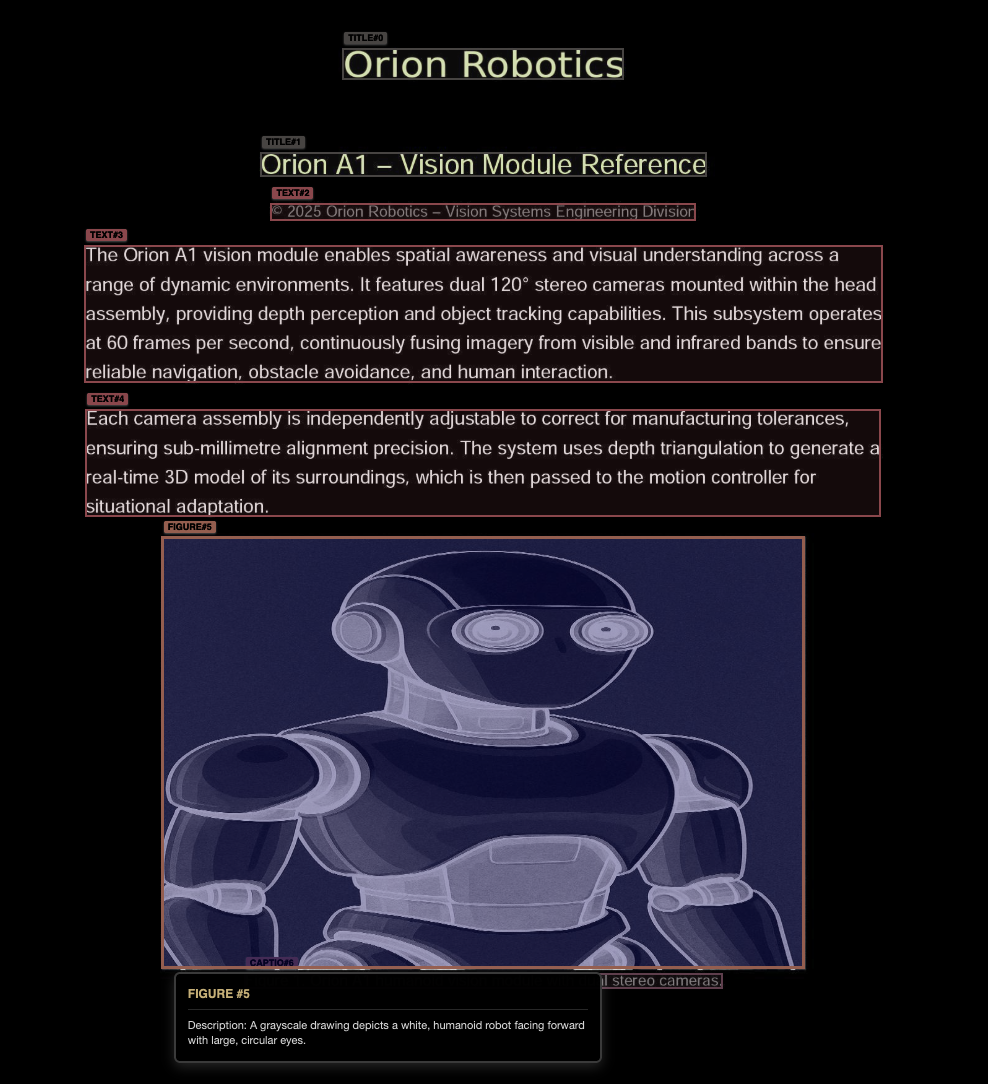
This ai_parse_document Databricks function will produce a JSON
document containing this - note the type (text/figure) and coordinates
showing the position in the document.
{"elements": [
  {
    "bbox": [{"coord": [181, 1044, 807, 1501], "page_id": 0}],
    "confidence": 0.9992,
    "content": "As illustrated on the right, the firmware follows a closed-
                loop flow: sensors feed a Kalman-based state estimator,
                which refines motion data before forwarding it to the PID
                controller. Commands are transmitted to motor drivers, while
                encoders provide feedback for precise error correction.
                This structure allows Orion A1 to walk fluidly, react
                to collisions, and recover from instability with minimal
                delay.",
    "description": null,
    "id": 4,
    "type": "text"  // <== Extracted from OCR
  },
  {
    "bbox": [{"coord": [301, 459, 1353, 1010], "page_id": 1}],
    "confidence": 0.9467,
    "content": "Response Curve: Tuned vs Untuned PID\nTuned PID
                \nUntuned PID\nOutput (%)\nTime (ms)",
    "description": "Two lines, one solid and one dashed, illustrate
                    response curves labeled \"Tuned PID\" and
                    \"Untuned PID\" against a time scale.",
    "id": 9,
    "type": "figure"  // <== An OCR'ed and visually interpreted image
  }
]}
The result with bounding boxes can be displayed with DocumentRenderer:
# Import the DocumentRenderer helper class
import sys, os
sys.path.append(os.path.abspath('..'))
from Includes.document_renderer import render_ai_parse_output, render_ai_parse_output_interactive

# Select a sample document and render its parsed content using render_ai_parse_output
sample = parsed_df.select("parsed_content").limit(1).collect()
doc = sample[0]["parsed_content"]

render_ai_parse_output(doc)First, pull the content into an additional column.
from pyspark.sql.functions import expr
from pyspark.sql import functions as F

# Create a UDF to extract the content
# => Convert VARIANT/struct/map to a JSON string first (avoids VariantVal issues)
safe_json_col = F.coalesce(
    F.to_json(F.col("parsed_content")),
    F.col("parsed_content").cast("string")
)

# Apply the UDF
plain_text_df = parsed_df.withColumn(
    "plain_text",
    extract_contents_udf()(safe_json_col)
)

# AI-QUERY Function
# Alternatively, we can give the JSON to an LLM to summarize to markdown
ENDPOINT = "databricks-gpt-oss-20b"
prompt_prefix = ''' You are a helpful assistant. Given a JSON object
representing a parsed document (with pages, elements, and metadata),
convert the content into clean, readable markdown. Use "== page ==" to
separate each page. Preserve important structure such as headers,
tables, and captions. Do not include any JSON or code blocks in the
output—just the clean markdown text.

JSON:
'''

# Apply ai_query to batch process the parsed JSON text
transformed_df = (
    parsed_df.withColumn(
        "clean_markdown_text",
        expr(f"""
          ai_query(
            '{ENDPOINT}',
            CONCAT('{prompt_prefix}', CAST(parsed_content AS STRING)),
            responseFormat => '{{"type":"text"}}'
          )""")))
Use a langchain object like RecursiveCharacterTextSplitter to split
each block of markdown text into a chunk.
from langchain_text_splitters import RecursiveCharacterTextSplitter
from pyspark.sql.types import StructType, StructField, StringType
import pandas as pd

# Build the text splitter with preferred separators
splitter = RecursiveCharacterTextSplitter(
    chunk_size=2000,
    chunk_overlap=200,
    separators=["\n== page ==\n", "== page ==", "\n\n", "\n", " ", ""]
)

def split_rows(iterator):
    for pdf in iterator:
        out = []
        for _, row in pdf.iterrows():
            path = row["document_path"]
            text = row["plain_text"]
            if isinstance(text, str) and text.strip():
                for c in splitter.split_text(text):
                    if c and c.strip():
                        out.append((path, c))

        # Provide the full path to the document and the text chunk
        yield pd.DataFrame(out, columns=["path", "chunk"])

# Apply the splitter to the plain text DataFrame:
schema = StructType([StructField("path", StringType(), True), StructField("chunk", StringType(), True)])
df_chunks = (
    plain_text_df.select("path", "plain_text")
    .mapInPandas(split_rows, schema=schema)
)Applying an embedding algorithm to chunks of text enables us to compare and find that text according to its semantic meaning - that is, the concepts and ideas instead of a 1:1 string comparison.
Comparing Embedding Vectors:
Vector Search Strategies:
Reranking can occur after a vector search to reassess and order the similarity of the most similar chunks and/or documents.
Mosaic AI Vector Search:
Databricks includes the Mosaic AI Vector Search database, which provides:
IMPORTANT: The change data feed feature must be enabled on the table in Databricks for vector search to prevent re-embedding.
After using the GUI to create a vector search index on your chunks table, we can create a client to perform vector searches.
from databricks.vector_search.client import VectorSearchClient
from databricks.vector_search.reranker import DatabricksReranker

# Initialize the Vector Search client for later use
vsc = VectorSearchClient(disable_notice=True)
index = vsc.get_index(index_name=f"catalog.yourschema.docs_chunked_lab_index")
print(index.describe())

query_text = "How does the motion controller maintain balance during rapid movement?"

# Perform similarity search:
reranked_results = index.similarity_search(
    query_text=query_text,
    columns=["path", "chunk"],
    num_results=3,

    # Optional: provide a re-ranker
    reranker=DatabricksReranker(columns_to_rerank=["chunk"])

    # Optional: filter by particular document/path
    filters={"path LIKE": "05_Orion_Maintenance_and_Servicing_Guide_v3.pdf"},

    # Optional: just run full-text search
    query_type="FULL_TEXT",

    # Optional: hybrid search that uses keywords as well
    query_type="HYBRID",
)

# Print search results
display(reranked_results)An AI agent is an intermediary between a human (or another LLM) and a data system, combining one or more LLMs, MCP servers, callable functions/tools, and connections to databases and file servers. Agents have the agency to make decisions and take actions. Frequently they also have memory systems to save conversation data and learned information.
Categorizations for AI Agents:
MLflow3 and LangChain4 can be used on Databricks to build auditable AI agents.
“MLflow is the largest open source AI engineering platform for agents, LLMs, and ML models. MLflow enables teams of all sizes to debug, evaluate, monitor, and optimize production-quality AI applications while controlling costs and managing access to models and data." 3
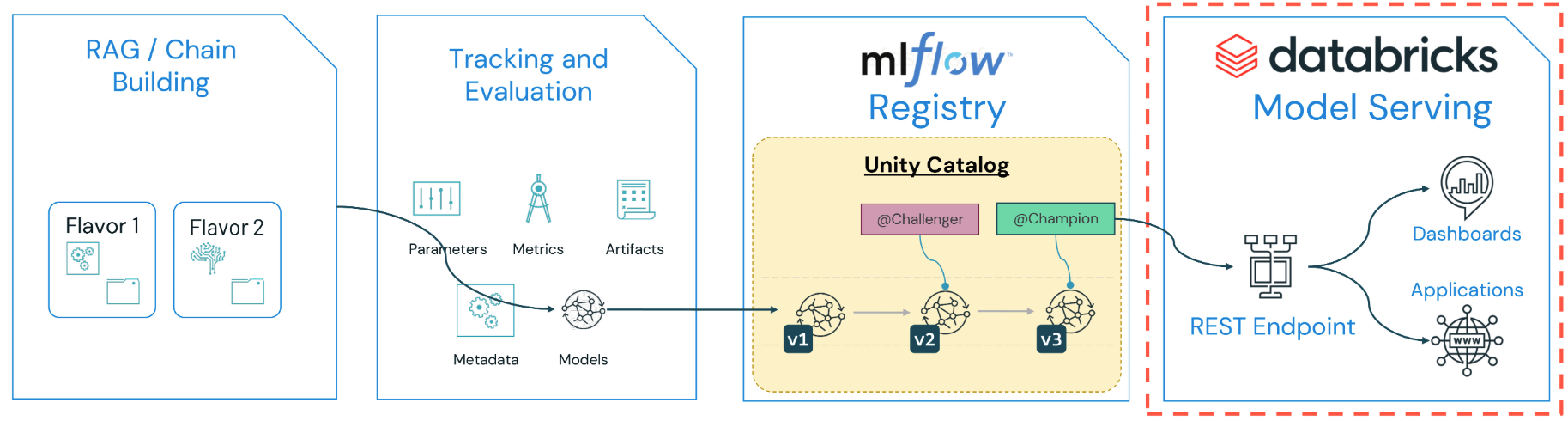
Anything from LLM inference to ML models and normal python code can be stored and used as a model in the Unity Catalog.
MLflow Models are folders that contain key files and a MLModel file,
which includes flavors which are interfaces (ways to use the model.)
Deployment Types balance throughput and latency:
Lifecycle Management:
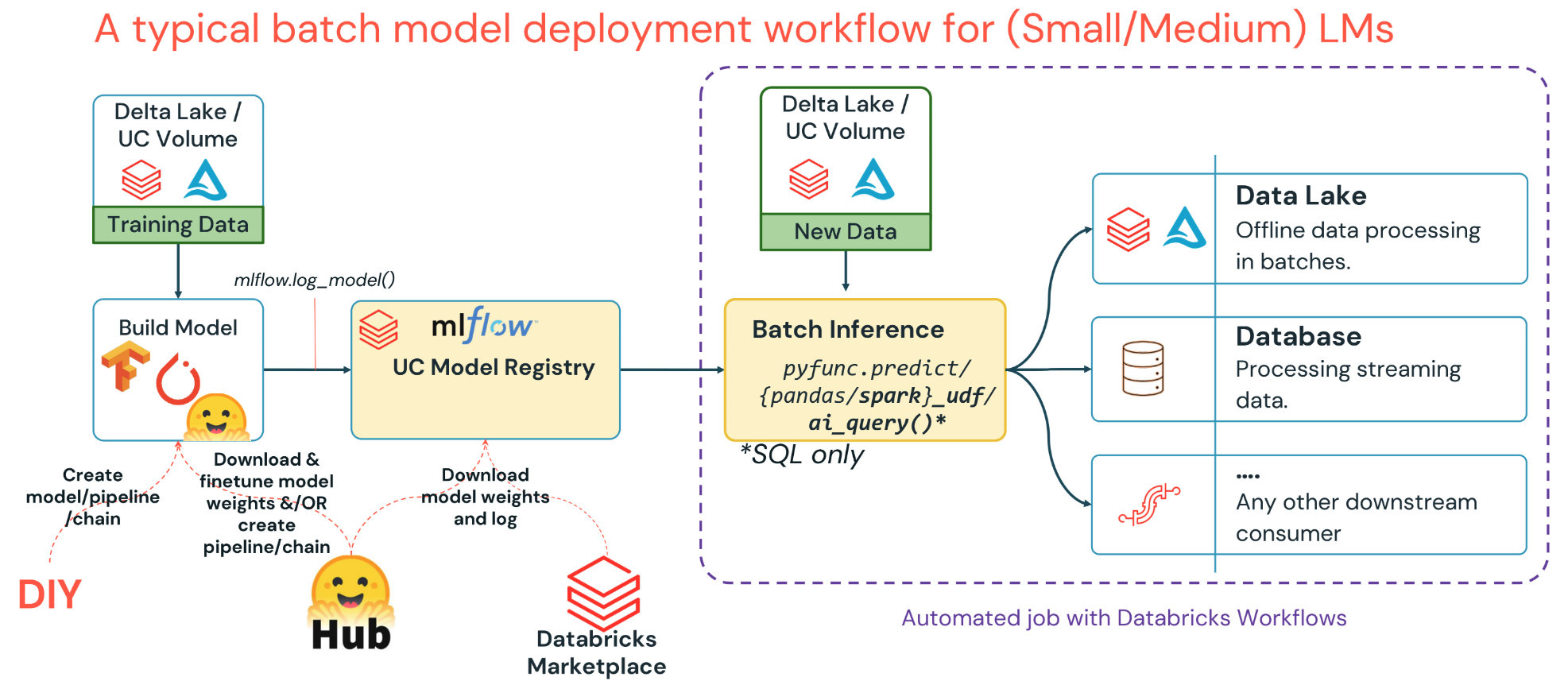
Batch deployments are ideal for cases when the volume of new records to process is very large, immediate replies are not necessary, and a high latency is OK. These can be implemented easily and run when compute is cheapest - though the data may be stale.
Batch Deployment Inference Options:
pyfunc.predict)ai_query() function with a prompt and incoming text data-- Query foundation models API from Databricks SQL
SELECT AI_QUERY(
"databricks-dbrx-instruct",
CONCAT(
"Based on the following news article, provide keywords as a JSON array. Article: ",
article_content
) AS article_keywords FROM articles;See LLM Inference Performance Engineering: Best Practices
Let’s deploy a small language model ( t5-small ) as an example:
import mlflow
from toolz.dictoolz import merge
from mlflow.models import infer_signature
from mlflow.transformers import generate_signature_output
from mlflow import MlflowClient

# Load and set up the model
from transformers import pipeline

inference_config = {"min_length": 20, "max_length": 40, "truncation": True, "do_sample": True}
summarizer = pipeline(
    task="summarization",
    model="t5-small"
    **inference_config,
    device_map="auto", # or 'cuda', 'cpu'
    model_kwargs={"cache_dir": "/hf_cache"}) # Specify cache_dir to use pre-cached models.

text_to_check = """
The price of gas across Canada remained high this week. Although
prices at the pumps have dipped slightly here and there since the
start of the war in Iran, these high prices are expected to continue
for some time. The mantra from government, industry and financial
analysts is that high prices are inevitable because of geopolitical
instability.
"""

summarizer(text_to_check)[0]["summary_text"]
# ==> 'prices at the pumps have dipped slightly here and there since
# the start of the war in Iran. These high prices are expected to
# continue for some time.
Let’s set up and “log” our model, which packages it with metadata:
# It is valuable to log a "signature" with the model telling MLflow
# the input and output schema for the model.
output = generate_signature_output(summarizer, text_to_summarize)
signature = infer_signature(text_to_summarize, output)
print(f"Signature:\n{signature}\n")

# Set experiment path
# (located on the left hand sidebar under Machine Learning -> Experiments)
experiment_name = f"/Users/{username}/Batch-Demo"
mlflow.set_experiment(experiment_name)
model_name = "micro-summarizer" # Name of folder containing serialized model


with mlflow.start_run():
    mlflow.log_params(merge({"hf_model_name": hf_model_name}, inference_config)))

    # Returns model metadata to the tracking server
    model_info = mlflow.transformers.log_model(
        transformers_model=summarizer, # <== KEY: Registers the pipeline/object
        name=model_name, # old: artifact_path
        task="summarization",
        inference_config=inference_config,
        signature=signature,
        input_example="This is an example of a long news article which this pipeline can summarize for you.",
    )
You can now see “summarizer” in your models tab and test it with the code provided:
loaded_summarizer = mlflow.pyfunc.load_model(model_uri='models:/m-56b414819a0sd8f0a98d71e9bee6b')
loaded_summarizer.predict(text_to_summarize)

# Point to Unity-Catalog registry and log/push artifact
model_name = f"{catalog_name}.{schema_name}.summarizer"
mlflow.set_registry_uri("databricks-uc")
mlflow.register_model(
    model_uri=model_uri,
    name=model_name,
)

# Get as a Spark UDF:
# Grab `Champion` model (supposed to be latest production version)
prod_model_udf = mlflow.pyfunc.spark_udf(
    spark,
    model_uri=f"models:/{model_name}@champion",
    env_manager="local",
    result_type="string",
)

# Run on a dataframe
batch_inference_results_df = prod_data_df.withColumn("generated_summary", prod_model_udf("document"))
display(batch_inference_results_df)
The model is now “deployed” and ready to use.
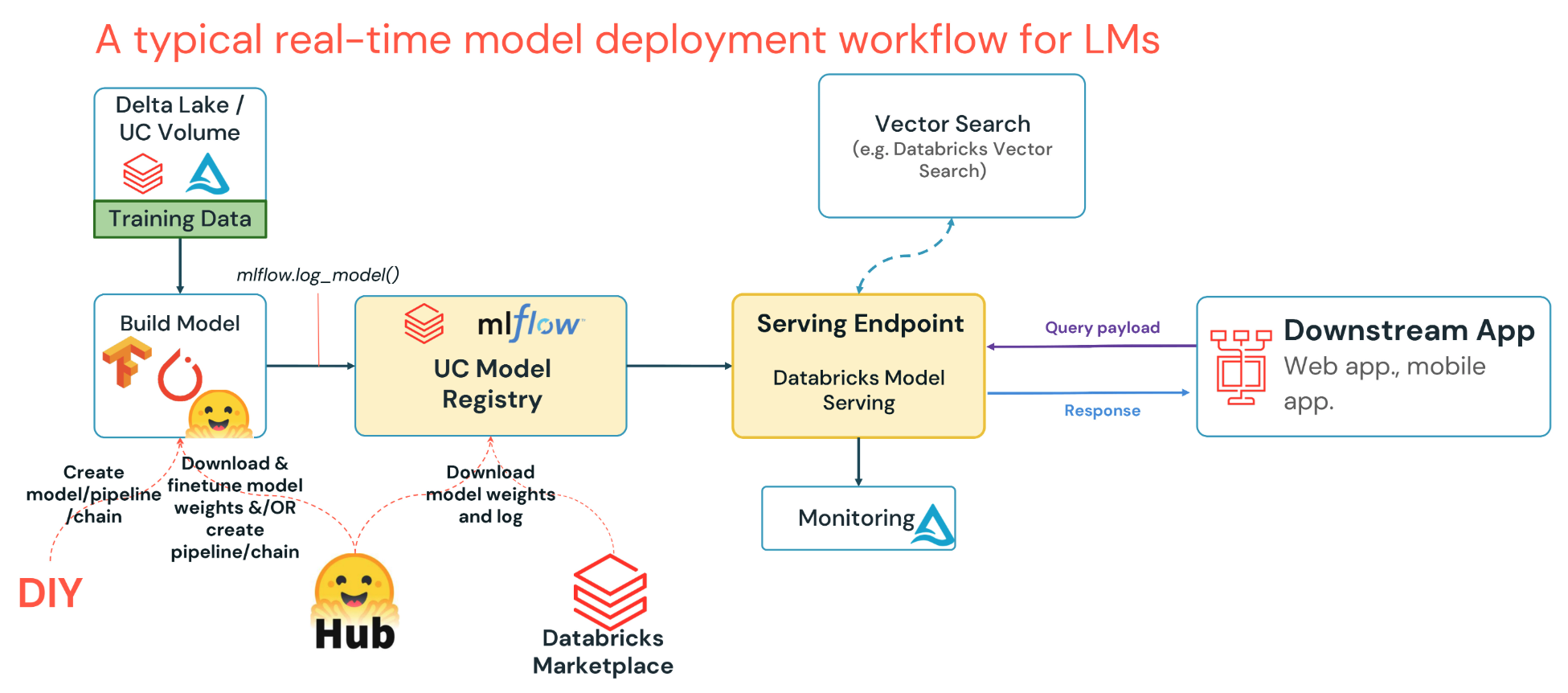
Databricks Model Serving provides a production-ready solution to deploy models with built-in payload logging and observability.
Lakehouse Monitoring can be used to monitor the queries and responses returned by your deployed models. Essentially:
Essentially:
Judge Types:
# Correctness: Compare the response to a two-column dataset with expected results
from mlflow.genai.scorers import Correctness

correctness_eval = Correctness(
    model="databricks:/foundation-model-endpoint"
)

correctness_results = mlflow.genai.evaluate(
    data=eval_dataset,
    predict_fn=lambda input: agent.predict({"input": input}),
    scorers=[correctness_eval],
)

# Guidelines example: provide a rule to evaluate, and an LLM will score it
from mlflow.genai.scorers import Guidelines

language_guideline = Guidelines(
    name="spanish",
    guidelines=["The response should be in Spanish"],
    model_name = guidelines_endpoint
)

guidelines_dataset_results = mlflow.genai.evaluate(
    data=guidelines_dataset,
    predict_fn= lambda input: agent.predict({"input": input}),
    scorers=[language_guideline]
)Repositories of YAML files for easy validation and deployment of artifacts, resources, and configurations. Code can be co-versioned with configuration and running infrastructure.
databricks bundle deploy -t "development"
databricks bundle run pipeline -refresh-all -t "development"
See: github.com/databricks/bundle-examples
Databricks Training Material: Lecture 1.1 ↩︎
Anecdotal, check with tiktokenizer.vercel.app or other tool ↩︎
MLflow Documentation: mlflow.org/docs/latest/ml ↩︎ ↩︎
LangChain Documentation: docs.langchain.com ↩︎
Pages are organized by last modified.
Title: Databricks
Word Count: 2728 words
Reading Time: 13 minutes
Permalink:
→
https://manuals.ryanfleck.ca/databricks/